Call us 1-866-722-6567
Contact Us | Find a Dealer
You Are Here:   Home > Products > Print Varnish > Glamour 2

Glamour 2

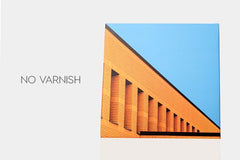
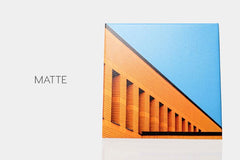
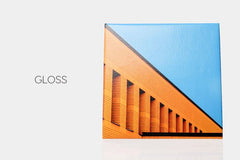
Surface: Available in Gloss and Matte
Thickness: N/A
Optical Brightener: N/A
Archival Certified: Yes
Status: In Stock


DESCRIPTION

Glamour II Veneer, an award-winning and proprietary canvas varnish (and/or giclee varnish), has been developed to protect, preserve and enhance fine art and photographic prints produced on digital inkjet printers. This new non yellowing, water based canvas varnish is a perfect solution for easy inkjet print finishing. Glamour II will enhance the color of pigmented and ultrachrome inks on matte media and increase resistance to image fading. It will protect your expensive images against moisture and abrasion.

Glamour II Veneer giclee varnish has been specifically developed as a water based product to avoid the unpleasant and hazardous fumes given off by solvent based products, and is an absolutely perfect compliment to our very own Brilliance Canvas range. The combination of Glamour II Veneer with our Brilliance "Chromata White" Canvas (free of optical brightener additives) delivers the most archival and color-stable fine art reproduction available. Please visit the FAQ to get tips on how to varnish our Chromata Canvas range.
 

Listen In

Is it necessary to laminate canvas prints?

We sat down with Breathing Color President Nick Friend and Vice President Adam Hill to answer this complex question

Listen


Instructions

Hand Rolling

PDF: Download
VIDEO: PC | MAC

HVLP Spraying

PDF: Download
VIDEO: coming soon...
VIDEO: DIY HVLP Spray Booth for Under $125

HVLP Spray Gun Recommendation:

If you would like to spray coat your prints using an HVLP system (high volume low pressure), we recommend the Fuji 2903-XPC Mini-Mite 3 HVLP Spray System.


Sizes & Prices:

 Buy 1Buy 3+
(17% off)
Buy 10+
(27% off)
Qty
Glamour II Veneer - 1 Gallon Gloss
$96.25$79.89$70.55
Glamour II Veneer - 1 Gallon Matte
$96.25$79.89$70.55
Glamour II Veneer - 1 Pint Gloss
$21.35--
Glamour II Veneer - 1 Pint Matte
$21.35--


Details

Downloads - Spec Sheet

inkjet canvas data sheet


Other Product Information

In smaller production, Glamour II Veneer giclee varnish should be roll brush applied. Only one coat is necessary. Glamour II Veneer can also be brush applied, sprayed, and used in roll coaters. The product has self-leveling qualities that make it virtually ideal for one-step hassle free coating and no streaks.

Glamour II Veneer is available in Gloss and Matte finishes. Furthermore, Gloss and Matte can be mixed together, enabling you to creatively produce your own perfect look and feel. Whether it be gloss, semi-gloss, semi-matte - the choice is completely yours.

*Glamour II Veneer is also commonly used as a very effective mounting adhesive.

Always heat the water before you mix with Glamour II Coating. Put a cup of distilled water in the microwave for 8-10 seconds, then mix. This will make mixing easier and allow G2 to be applied more evenly and effortlessly. Do not apply any pressure with the foam roller. Only use the weight of the roller to spread around the coating. Pressure will cause streaks and lines that are impossible to get out. It will also cause air to pass through the foam roller and inject into the coating, creating air bubbles. The canvas is so thirsty that it will pull the coating into the weave, by itself. Be VERY generous with the coating. Your print should look like you have spilled a glass of water on it. Almost every problem that can happen during this coating process can be solved by using more Glamour II. Be generous. Do not spend too much time coating. The more you work it the worse it gets. Quickly spread the coating around the print, making sure there is a lot of coating touching every area, then walk away. THE PRINT WILL NOT LOOK PERFECT WHEN YOU WALK AWAY. Do not try to make the print look perfect or even while it is still wet. Do not watch the print dry. Just spread Glamour II around as quickly as possible, then walk away. There are leveling agents in the coating will do the rest.

Do not use the bumps inside the roller tray. They will definitely leave an impression on the print itself.

When rolling, dilute no more than 30% with distilled water. You may experiment with using less water, but never use more. Water is only a vehicle to allow the coating to spread around quickly and easily. As a general rule, the less water, the better.

When spraying, dilute no more than 50% with distilled water. Depending upon your HVLP gun, you may be able to dilute only 30% with distilled water, which would be ideal. Only use an HVLP gravity feed gun when spraying. Spray the prints flat, or at a 30 degree angle. Spray one heavy coat first, then about 30-45 minutes later, spray a thinner coat.

FAQ

Questions

1, How Do I Mount My Inkjet Canvas or Fine Art Paper With Glamour II Veneer?
2, What water dilution ratio should I use for coating with a foam roller?
3, I'm getting air bubbles while coating canvas with Glamour II. What am I doing wrong?
4, What are optimal drying conditions for Glamour II Gloss/Matte?
5, I am experiencing canvas cracking after coating a roll of canvas with Glamour II. Are there any solutions?
6, Is Glamour II Veneer hazardous to your health?
7, I notice that my prints are very "tacky" several days after coating.
8, Can I paint on top of the applied coating?
9, How can I apply Glamour II?
10, Can I Store Glamour II Veneer After I Dilute It?
11, What Pressure Setting Should I Use On My HVLP Gun When Spraying Glamour II Veneer?
12, How Do I Clean Up Glamour II Veneer?
13, What Is The Best Way To Dry Glamour II Veneer?
14, How Long Does It Take For Glamour II Veneer To Dry?
15, Coating with Glamour II Giclee Veneer, General Tips
16, How Do I Stop Glamour II Veneer From Streaking?
17, How do I create a matte finish using Glamour II?
18, Ink is coming up on my roller when I coat. What do I do?
19, My coated prints dried with bubbles and pinholes. How do I prevent this?

Answers

Q: How Do I Mount My Inkjet Canvas or Fine Art Paper With Glamour II Veneer?
A:

While not specifically designed for this purpose, Glamour II Veneer can be used as a mounting adhesive.  When you are using Glamour II Veneer as a mounting adhesive, you want to dilute it 10% with distilled water. After diluting, apply it to the surface that you will be mounting your inkjet canvas or fine art paper print to, then work out any bubbles or uneven surfaces.  Once mounted, remove any excess coating around the edges of your print.  


Q: What water dilution ratio should I use for coating with a foam roller?
A:

The recommended water to varnish ratio is: 30% distilled water and 70% coating. It is very important that you distilled water, rather that tap or drinking water.  The minerals added to drinking water will effect the integrity of the coating. Before mixing the water into the varnish, heat up the water in the microwave. Heating up the distilled water will help improve the effect of the self level agents leaving your print with no roller streaks. It is always safe to have less water than coating.  A major problem with coating canvas is users over diluting the coating.


Q: I'm getting air bubbles while coating canvas with Glamour II. What am I doing wrong?
A:

Air bubbles can be caused by a variety of things.  Breathing Color has tested every single possible variable to the foam rolling process of coating. Most of the time bubbles in the print are caused by "under rolling."  You want to cover your print by going in multiple directions, not just one. The canvas has to "drink" the coating in.  If you see bubbles at the start of your coating process, it is the canvas sucking the coating into the print. The desired dilution ratio of water to coating is 30% water 70% coating.  There has been cases of bubbles forming from over diluted coating. Please allow the canvas 24 hours of dry time as well. After 24 hours when you come back to your print, youl will notice that the bubbles have disappeared.


Q: What are optimal drying conditions for Glamour II Gloss/Matte?
A:

Optimal drying conditions for our Glamour II would be 65 degress or higher and 60% relative humidity or lower. Also keep in mind it is always a good idea to have a low dust drying enviroment. It is not a good idea to have any type of fan on while drying varnish. If you have a high ceiling or cannot control the temperature at night, when out of the sudio/office, space heaters can be used to boost the average temperature and should not effect the integrity of the product.


Q: I am experiencing canvas cracking after coating a roll of canvas with Glamour II. Are there any solutions?
A:

Almost every problem that can occur with Glamour II, can be solved by using more of it. If you are experiencing cracking, chances are you did not use enough of it. Therefore, make sure when spraying your prints, that you always use 2 heavy coats. Though Glamour II is temperature sensitive and is mildly susceptible to environmental conditions, your prints should never crack if you have applied enough Glamour II.  When applying Glamour II with a foam roller, you still should be able to get away with one coat, but make sure you apply the Glamour II generously.


Q: Is Glamour II Veneer hazardous to your health?
A:

Glamour II Veneer is a practically odorless water-based coating that can be applied in a closed room. It is NOT a solvent-based coating which in contrast are extremely hazardous and emit very strong odors. If you are more sensitive to chemicals and odors, or are generally concerned with health, then we would always recommend using a mask when applying any coating from any manufactuer -- just to be on the safe side.


Q: I notice that my prints are very "tacky" several days after coating.
A:

Dilute more. If you dilute less than 30% with water, the more likely this is to happen. If you are diluting with 30% already, try 40% or even 50% to reduce tackiness. Make sure the coating has completely dried and is no longer sticky before storing prints face-to-face or putting them behind a temporary frame that you ultimately intend to remove. Also try using a thinner coat. If you are using too much product, this could happen.


Q: Can I paint on top of the applied coating?
A:

Glamour II Veneer giclee coating has been known to work with various artist paints for embellishment, however it is always recommended that you perform a test with a small scrap of coated canvas to avoid a negative reaction.


Q: How can I apply Glamour II?
A:

Glamour II Veneer giclee coating can be rolled on with a dense foam roller, sprayed on with an HVLP gun (50% dilution), or used with a roll coating machine (50% dilution).

When rolling Glamour II Veneer you are going to want to dilute it down 25%-30% with warm distilled water.  You can apply the glamour directly to the print, and then immediately start to roll the Glamour II onto the canvas.  Do not apply pressure to the roller, and make multiple passes in opposite directions.  A good way to know if you are almost done rolling, is to listen for the "sticky" sound of the Glamour II.  This means that the coating has been worked into the canvas and is starting to dry.  The more time you spend working the Glamour II into the canvas, the faster it will dry and the better your print will look.  Please allow at least a full 24 hours for your print to dry.


Q: Can I Store Glamour II Veneer After I Dilute It?
A:

We do not recommend storying Glamour II Veneer after it has been diluted. Only dilute as much as you will need when you are coating. Storing Glamour II Veneer after diluting can cause it to separate and harden.


Q: What Pressure Setting Should I Use On My HVLP Gun When Spraying Glamour II Veneer?
A:

We do not recommend an air pressure setting as not all guns, air compressors, nozzles, etc. are the same. Therefore it is recommended that customers using an HVLP gun to coat with Glamour II Veneer test several different pressure settings and coating techniques to determine the best solution for each unique setup is.


Q: How Do I Clean Up Glamour II Veneer?
A:

Water is the only cleanup needed for Glamour II Veneer to be removed from the foam roller and other surfaces. If the coating becomes difficult to remove from any surface, including the HVLP reservoir, 409 all purpose cleaner will disintegrate Glamour II Veneer upon contact.


Q: What Is The Best Way To Dry Glamour II Veneer?
A:

Heat lamps are not suggested for drying Glamour II Veneer. In fact, cold air is the best way to dry Glamour II Veneer but be careful if you are considering a fan not to blow dust or debris onto a wet print.


Q: How Long Does It Take For Glamour II Veneer To Dry?
A:

Glamour II Veneer, like all varnishes and veneers, need to be dried before stretching or mounting. Glamour II Veneer is a water-based coating therefore drying time can vary drastically depending on where it is being used. In very dry climate, Glamour II Veneer can dry within thirty minutes. In very wet climate, Glamour II may not dry for two hours. The average drying time, however, is approximately 45 minutes to 1 hour.

The drying time for this product can also vary based upon your chosen dilution ratio. The more you dilute, the faster it will dry. If you don't dilute at all, Glamour II could take several days to dry. A minimum 20% dilution is normally required, although some of our customers have discovered their own method of applying without dilution.


Q: Coating with Glamour II Giclee Veneer, General Tips
A:

To create the most consistent finish on your print, make sure you follow a few pointers:

1) Make sure you have about 30% water. (40% is a good dilution as well, but your gloss will slowly lessen with more water, and you can always coat twice.) A good way to prevent an inconsistent mixture of water and coating is to use hot water. Hot water will will make sure that the water is completely mixed into the coating.
2) Make sure you roll gently. The less pressure you apply on the roller, the less varnish squeezes out from the side of the rollers that create streaks.
3) Make sure you have a thick enough coating. To ensure that you have enough coating, I recommend pouring the Glamour II directly onto your print. You can pour 3-4 thin lines across your print. This also eliminates the process of having to re-dip your roller back into the tray.
4) Make sure you allow your print to sit even if you see light streaks or differences in thickness in coating. If the coat is thick enough, Glamour II will self-level.


Q: How Do I Stop Glamour II Veneer From Streaking?
A:

Hopefully you have already watched our instructional video on "How to Apply Glamour II Veneer" which provides a very detailed look at how to apply Glamour II Veneer properly.

If you still have streaks, there are a few things you need to focus on:

(1) How much are you diluting with water? Try adding more water (at least 40%).
(2) Before adding the water to the coating, heat it in the microwave for about 8 to 10 seconds depending on how much water you are adding. The water should be above luke warm but not boiling. The heated water will help in mixing with Glamour II Veneer.
(3) When stirring the heated water and Glamour II Veneer together, stir lightly and slowly. If you try to mix them together too fast or too aggressively, it can create air bubbles that are difficult to get out of the coating once it is applied to the print. Once dried, these air bubbles are even more visible and can ruin your print.
(4) When you are first applying Glamour II Veneer to your inkjet canvas or fine art paper, be very generous with the application. Some of our customers even find success in pouring the coating directly onto the print in even lines across the whole print. Once this is done, the foam roller is then just used to spread the Glamour II Veneer around evenly.
(5) If you decide to apply Glamour II Veneer without pouring it straight onto the inkjet canvas or fine art paper and instead apply it with the foam roller directly, make sure to stay away from any bumby parts of the tray with the foam roller. When you are moving the roller around in the tray to saturate it with Glamour II Veneer, the bumbs can cause indentations in the foam which will transfer over to your prints and ultimately leave some service uncovered.
(6) Try to go over the print with the foam roller the least amount of times possible. We have found that the more times you run your foam roller over the Glamour II Veneer, the more coating you are actually taking off of the print. If you still see lines in the coating, wait until it dries to see if they go away. If you have been generous enough with the coating, the leveling agents in the Glamour II Veneer will cause the streaks to go away as it is drying.
(7) Apply the least amount of pressure possible when going over your inkjet canvas or fine art paper with the Glamour II Veneer. Pressure will cause indentations in the coating which will cause streaks once it has dried.
*this article will help if you have streaks, streaking, or lines when trying to apply Glamour II


Q: How do I create a matte finish using Glamour II?
A:

There are a couple different techniques that you can use to acquire a matte finish using our varnish. First off which would be to apply a thin coat of gloss varnish first. Please wait for it to become fully dry before taking the next step. After the print has dried, you can apply a heavy coat of matte over the first thin gloss base coat. This should give it a matte finish when it has completed drying.

Another method would be to mix the varnish together. Glamour II Gloss and Glamour II Matte are 100% compatible with each other. A good gloss-to-matte ratio would be 20% gloss - 80% matte.

This process may require some trial and error to find what ratio best suits your prints. However, 20% gloss and 80% matte seems to be a an average ratio for matte finishes.

Once you have found your desired ratio, it would be a good idea to invest in a graduated cylinder (the glass instrument use to measure fluids). This will make it very easy to maintain the exact same coating ratio for all of your prints.


Q: Ink is coming up on my roller when I coat. What do I do?
A:


Be sure that you have used the correct print settings/profile for your printer and canvas. If the wrong media type is used you could potentially print with too much ink. If there is excess ink this will only dry on the surface and when coating with a foam roller, the excess ink will be agitated and come out on the roller (and your print).

If you have insured the proper print settings were used, make sure you allowed enough time for the print to dry. Ink can come up when the roller has changed directions since it’s an abrasive move, which causes more friction. With Timeless, this is especially important since it requires pressure to apply. Always apply coating in straight lines as this will not damage the print at all.


Q: My coated prints dried with bubbles and pinholes. How do I prevent this?
A:

These issues are typically caused by too much coating. Since canvas needs to absorb coating eventy, too much coating creates air pockets in the canvas. When the air tries to escape, it pushes itself out either partially (air bubbles) or completely (pinholes). If you notice these issues while the print is still wet, simply go over these areas with your roller with light pressure (Timeless) or no pressure (Glamour II). If you are spraying with an HVLP gun, try going over the print with a light 2nd coat as this usually fills in the pinholes and breaks the air bubbles. This must be done while the print is wet.


Reviews

*Award Winner:  Bon Air Artists Award*

Craig Rudlin Says:

"Here is the image of the photograph that won the "Bon Air Artists Award". (There were 100 artists exhibiting at the show. This award represents second place out of the entire show-- I am overwhelmed by the honor!) The image is of Antelope Canyon, AZ. It is a HDR image, i.e. the composite of six different exposures. Taken with Nikon D300, Lens Nikon 24-70. For the show, I printed the image 20x30 inches on the Lyve Canvas and used your Glamour II varnish (with our own special mixture of matte and gloss!). The remarkable gamut, the brilliance of the colors and their "depth", and the clarity(sharpness) of the image, all contributed to the impact of the photo. "

Craig Rudlin
CR Photography
http://www.cowanandrudlinphotography.com

Michael Gilbert Says:

"In my 25 years in digital photography printing, Ive never seen color on a canvas look this good. My results show that the new OBA-Free Lyve Canvas provides at least a 15-20% improvement in color gamut and black density, and it's now a breeze to apply the Glamour II Gloss laminate. The new canvas allows for a luminous veneer like surface that makes each image look 3D. It's simply AMAZING and nothing else is even close. This canvas has established a new plateau in fine art printmaking."

Michael Gilbert MA.CR.XXV
Professional Photographer

About Michael: Michael Gilbert is a third generation photographer holding a Masters Craftsman Degree in Canada and the United States. In April 2005 he had a one-man show at the International Museum of Photography. The entire set of 52 photographs are kept in their permanent collection. Mr. Gilbert’s images are collected internationally and are a part of the collections of Epson, Canon, Hahnemuhle, Olympus, Mitsubishi, and Kodak. He is a frequent speaker at many Universities, Professional Photographers of America conventions, WPPI events and International exhibits. In 2006 Michael was a featured photographer at Photokina, the worlds largest photography event. His client list includes Mercedes Benz,Hallmark Cards,Four Seasons Resorts and Prudential. In the past Michael has worked for Earth Trust Green Peace and the International Federation of animal welfare. A Canadian by birth he now has his studios in Maui,Hawaii and Paris,France.

Andrew Darlow Says:

"All of the canvas prints (most about 38x60 inches stretched size) were
made on Breathing Color's Chromata White Canvas, and I was extremely
happy with the sharpness, detail, weave, consistency and way in which
the canvas looks on heavy duty stretcher bars. I mixed the gloss and
matte Glamour 2, and I was very happy with that as well. "

Andrew Darlow
Editor, The Imaging Buffet
http://www.imagingbuffet.com
Author, 301 Inkjet Tips and Techniques:
An Essential Printing Resource for Photographers - http://www.inkjettips.com

As Seen in